Guide
Custom Software Development: The Complete Guide for 2026
Custom software development is useful when a proven business workflow cannot be served well by existing configuration. The decision includes maintenance, integration, and who owns the system after launch.
I would prototype the costly gap before replacing a working core. A packaged product with a narrow custom layer often deserves a test alongside a full build.
This guide covers build vs buy, delivery stages, architecture, planning costs, and a worked scenario. The scenario is illustrative; its numbers are not a verified customer outcome.
TL;DR — the whole guide in five lines:
- Custom software makes sense when workflow fit creates business leverage, not when you simply dislike your current tools.
- Start with the riskiest assumption, then decide whether to buy, configure, integrate, or build.
- The real cost is scope clarity, not just engineering hours; unclear requirements turn every option into rework.
- A good partner should challenge the build, not rush you into a 6-month quote.
- Use a 2-week Blueprint first so you validate the workflow, scope, and business case before funding production software.

About the numbers: cost ranges and worked scenarios in this guide are planning assumptions, not vendor quotes or verified client results. Request a dated estimate with scope, currency, and operating costs.
What is Custom Software Development?
Custom software development is the process of designing, building, and maintaining software tailored specifically to your organisation’s needs—as opposed to purchasing pre-built, off-the-shelf solutions.
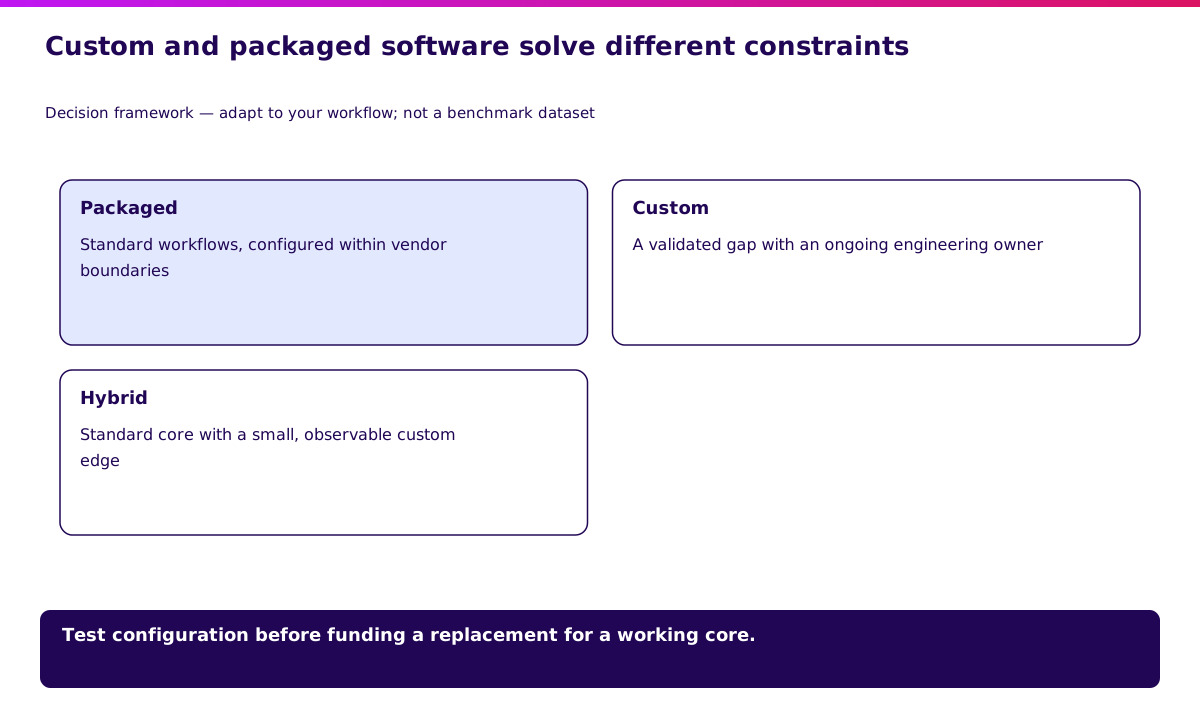
Think of it this way:
- Off-the-shelf software = buying a suit from a department store
- Custom software = having a suit tailored to your exact measurements
Both can work. But they solve different problems.
Custom Software vs Off-the-Shelf: Quick Comparison
| Factor | Custom Software | Off-the-Shelf |
|---|---|---|
| Fit | Built for your exact workflow | You adapt to the software |
| Upfront Cost | Higher ($50K-$500K+) | Lower ($0-$50K/year) |
| Ongoing Cost | Maintenance (15-20%/year) | Subscription fees compound |
| Time to Deploy | 3-12 months | Days to weeks |
| Competitive Advantage | Potential moat | Same tools as competitors |
| Ownership | You own the code | Vendor owns everything |
Neither option is universally better. The right choice depends on how core the function is to your business.
Rule of thumb: If the software IS your product or directly creates competitive advantage, build custom. If it’s a commodity function (email, accounting, basic CRM), buy.
Validate it in 2 weeks. Before committing to a custom build, use a Blueprint sprint to test whether the workflow, user need, and business case are real — see how Blueprint & Prototype works.
Types of Custom Software
Custom software isn’t one thing. It spans a spectrum from internal tools to customer-facing platforms.
1. Enterprise Systems
Large-scale platforms that run core business operations:
- ERP (Enterprise Resource Planning) — Integrates finance, HR, supply chain, and operations
- CRM (Customer Relationship Management) — Manages customer data, sales pipelines, and relationships
- WMS (Warehouse Management System) — Controls inventory, picking, packing, and shipping
- OMS (Order Management System) — Orchestrates orders across channels
These systems typically serve multiple departments and integrate with dozens of other tools.
2. Customer-Facing Applications
Software your customers or end-users interact with directly:
- Web applications — Portals, dashboards, self-service platforms
- Mobile apps — iOS and Android applications
- E-commerce platforms — Custom storefronts beyond Shopify/WooCommerce
- Booking systems — Appointments, reservations, scheduling
These require more attention to UX, performance, and scalability.
3. Integration & Middleware
The connective tissue between systems:
- API layers — Unified interfaces to disparate systems
- ETL pipelines — Extract, transform, and load data between platforms
- Automation engines — Business logic that orchestrates multiple systems
Often invisible but critical for operational efficiency.
4. Internal Tools & Automation
Software built for your team, not customers:
- Admin dashboards — Operational visibility and control
- Workflow automation — Replacing manual, repetitive processes
- Reporting tools — Custom analytics beyond what off-the-shelf provides
Frequently undervalued, but often delivers the fastest ROI.
Next: The Custom Software Development Process.
The Custom Software Development Process
Building custom software follows a predictable (if not always linear) process. Here’s how it works in practice.
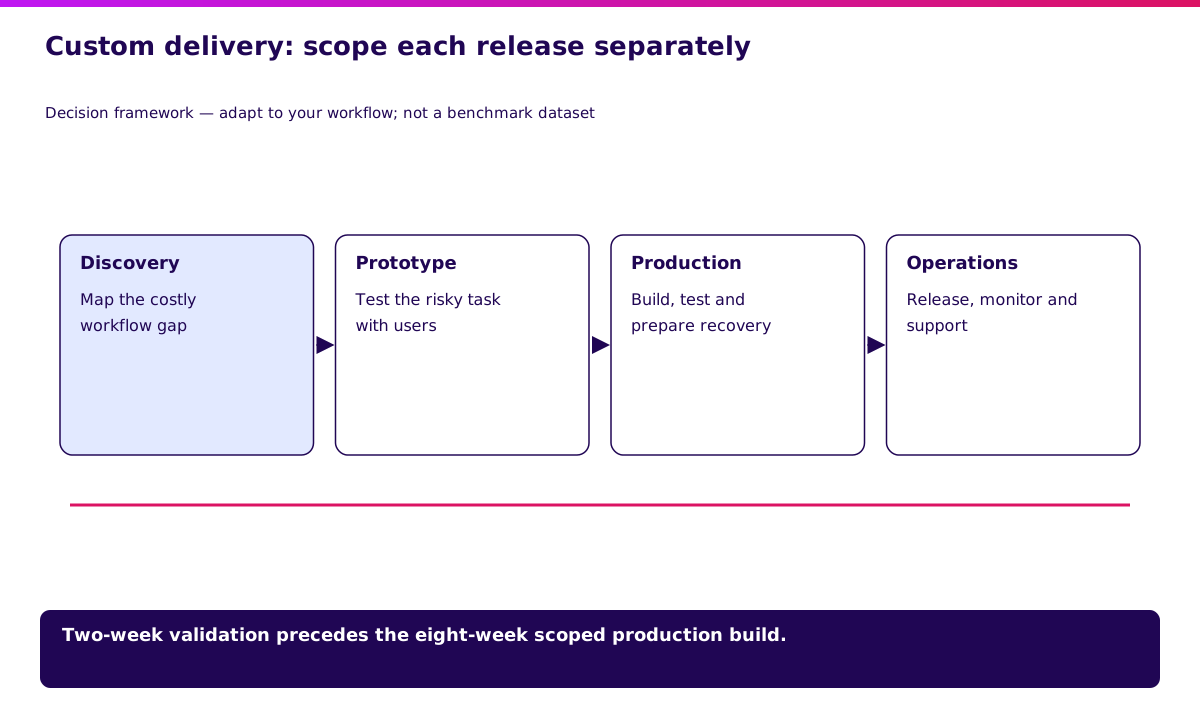
Phase 1: Discovery & Requirements (2-4 weeks)
Before writing any code, you need clarity on what you’re building and why.
Key activities:
- Stakeholder interviews — What problems are we solving?
- Current state mapping — How do things work today?
- Requirements documentation — Features, constraints, priorities
- Feasibility assessment — Technical and budgetary reality check
Deliverables:
- Project brief or Product Requirements Document (PRD)
- High-level scope and timeline estimate
- Go/no-go decision
Common mistake: Rushing this phase. Every hour invested in discovery saves 10+ hours in development.
Phase 2: Architecture & Design (2-4 weeks)
With requirements defined, architects design the system structure while designers shape the user experience.
Key activities:
- System architecture — How components connect, scale, and fail gracefully
- Technology selection — Languages, frameworks, databases, infrastructure
- UI/UX design — Wireframes, prototypes, user flows
- Security planning — Authentication, authorisation, data protection
Deliverables:
- Architecture diagram
- Tech stack documentation
- UI/UX designs (Figma, Sketch, or similar)
- API specifications
Common mistake: Over-engineering for scale you don’t have yet. Design for current needs with extension points for future growth.
Phase 3: Development (8-20 weeks)
Where ideas become working software. Modern development typically follows Agile principles: iterative cycles with regular delivery.
Key activities:
- Sprint planning — Break work into 2-week cycles
- Coding — Writing and reviewing code
- Daily standups — Team coordination and blocker removal
- Demo sessions — Show progress to stakeholders
Deliverables:
- Working software (incrementally)
- Code repository with documentation
- Regular progress updates
Best practice: Deploy to a staging environment early and often. The sooner stakeholders see real software, the better the feedback.
Phase 4: Testing & QA (Ongoing + 2-4 weeks)
Testing isn’t a phase at the end—it’s woven throughout development. But a dedicated QA period before launch catches what slipped through.
Testing types:
- Unit tests — Individual components work correctly
- Integration tests — Components work together
- End-to-end tests — Complete user flows function properly
- User Acceptance Testing (UAT) — Real users validate against requirements
- Performance testing — System handles expected (and peak) load
- Security testing — Vulnerabilities identified and addressed
Deliverables:
- Test coverage reports
- Bug tracker with resolved issues
- UAT sign-off
Common mistake: Treating QA as optional when deadlines slip. Technical debt from skipped testing always comes due—usually at the worst moment.
Phase 5: Deployment (1-2 weeks)
Moving from staging to production requires careful coordination.
Key activities:
- Infrastructure provisioning — Servers, databases, CDNs
- CI/CD pipeline setup — Automated build and deployment
- Data migration — Moving from legacy systems (if applicable)
- Rollback planning — How to revert if something breaks
Deployment strategies:
- Big bang — All at once (higher risk, simpler)
- Phased rollout — Department by department
- Blue-green — Run old and new in parallel, switch traffic
- Canary — Route small percentage of users to new version first
Deliverable: Production system, live and monitored.
Phase 6: Maintenance & Evolution (Ongoing)
Launch is the beginning, not the end. Software requires ongoing care.
Ongoing activities:
- Bug fixes and patches
- Security updates
- Performance optimisation
- Feature enhancements
- Infrastructure scaling
Budget expectation: Plan for 15-20% of initial build cost annually for maintenance.
Common mistake: No budget or team allocated post-launch. Orphaned software decays fast.
Next: When to Build Custom Software.
When to Build Custom Software
Custom development isn’t always the answer. Here’s how to know when it makes sense.
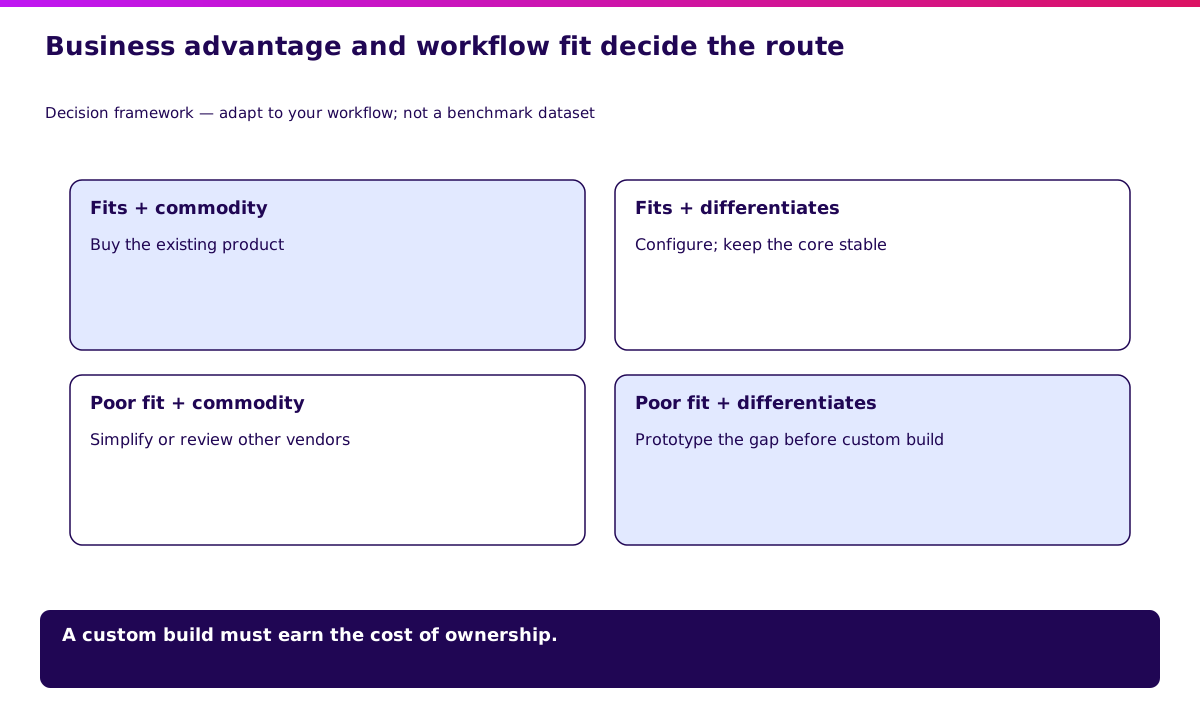
Signs You Need Custom Software
1. Off-the-shelf tools are fighting your workflow
If your team constantly works around the software—exporting to spreadsheets, maintaining manual processes alongside “automated” tools, or complaining “it doesn’t work the way we work”—that’s a signal.
2. You’re paying for features you don’t use (and missing ones you need)
Enterprise software is built for the average customer. If you’re far from average, you’re subsidising features irrelevant to you while lacking what actually matters.
3. Integration complexity is exploding
Three tools connected through Zapier is manageable. Fifteen tools connected through multiple integration platforms, with data inconsistencies and sync delays, is a house of cards.
4. The software IS your competitive advantage
If your business model depends on doing something better than competitors—faster fulfilment, unique customer experience, proprietary algorithms—generic tools won’t get you there.
5. Compliance or security requirements exceed standard offerings
Healthcare, finance, and government often have requirements that SaaS vendors can’t meet. Custom software can be built to spec.
When to Buy Instead
- Commodity functions — Email, document storage, basic accounting
- Rapidly evolving domains — AI/ML tools where the market changes quarterly
- Time-critical deployment — Need something working next week, not next quarter
- Small team without technical leadership — Custom software requires ongoing technical stewardship
The Hybrid Path
Often the best answer is neither fully custom nor purely off-the-shelf:
- Customise existing platforms — Salesforce, HubSpot, and others offer extensive APIs and customisation
- Build integration layers — Keep best-of-breed tools but unify them through custom middleware
- Custom front-end, standard back-end — Use Shopify for e-commerce backend but build a custom storefront
- Start SaaS, migrate custom — Validate with off-the-shelf, then build custom once you understand requirements deeply
Next: How Much Does Custom Software Cost?.
How Much Does Custom Software Cost?
The honest answer: it depends. The following ranges are illustrative planning inputs, not current market benchmarks.
Cost Tiers
| Complexity | Timeline | Planning Range (USD) | Examples |
|---|---|---|---|
| Simple | 2-3 months | $50K - $100K | Internal dashboard, basic CRUD app, simple automation |
| Moderate | 3-6 months | $100K - $250K | Customer portal, inventory system, booking platform |
| Complex | 6-12 months | $250K - $500K | Full CRM/ERP, marketplace, multi-tenant SaaS |
| Enterprise | 12+ months | $500K - $2M+ | Core banking system, healthcare platform, logistics network |
What Drives Cost
1. Scope and features More screens, more integrations, more user roles = more cost. Ruthless prioritisation of MVP features controls budget.
2. Technical complexity Real-time processing, complex algorithms, high availability requirements, and offline-capable mobile apps all add cost.
3. Design requirements A functional admin tool costs less than a consumer-grade, polished user experience.
4. Integrations Each external system you connect adds weeks. Legacy systems with poor documentation add more.
5. Team composition For a staffing sensitivity model, compare USD $150-250/hour with $30-80/hour. These are assumed inputs, not regional rate benchmarks. Include review, coordination, and rework in either case.
6. Timeline pressure Rushing adds cost through team scaling, overtime, and technical shortcuts that create future debt.
Hidden Costs to Plan For
- Infrastructure — Hosting, databases, CDN, monitoring ($500-$5,000/month)
- Third-party services — APIs, authentication services, email providers
- Ongoing maintenance — Bug fixes, security patches, updates (15-20%/year)
- Training and change management — Getting users to actually adopt the software
- Future enhancements — The backlog of “Phase 2” features
ROI Calculation Framework
Custom software should pay for itself. Model it:
Annual value created:
- Time saved × hourly cost of employees
- Revenue enabled by new capabilities
- Cost avoided (replacing multiple subscriptions, reducing errors)
- Competitive advantage (harder to quantify but real)
Break-even timeline:
- Total build cost ÷ Annual net value = Years to break even
If break-even exceeds 3 years, scrutinise assumptions. If it’s under 18 months, move quickly.
In my own delivery reviews, the projects that paid back fastest had one boring thing in common: everyone could explain the workflow in one page before development started. When the workflow took ten meetings to explain, the software usually became expensive translation work.
Next: Choosing the Right Development Partner.
Choosing the Right Development Partner
Most organisations don’t have internal teams to build custom software. Selecting the right partner is critical.
What to Look For
1. Relevant experience
Not just “we’ve built software” but “we’ve built this type of software.” Ask for case studies in your industry or with similar technical requirements.
2. Technical capability
Can they articulate architectural decisions? Do they follow modern practices (version control, automated testing, CI/CD)?
Ask about their tech stack and why they chose it.
3. Process and communication
How do they run projects? What visibility will you have?
How are decisions made when requirements are ambiguous? A partner who goes dark for weeks is a red flag.
4. Team stability
Will the people you meet in sales be the ones building your software? High turnover mid-project creates knowledge loss and delays.
5. Post-launch support
What happens after deployment? Is maintenance included?
What’s the response time for critical bugs?
Red Flags
- Fixed price for vague scope — Either they’ll cut corners or you’ll face change orders
- No discovery phase — Jumping straight to coding means assumptions will be wrong
- Reluctance to show previous work — Good partners are proud of their portfolio
- Single point of failure — One developer who knows everything is a bus factor of one
- Offshore-only with no local presence — Timezone and communication challenges compound
Engagement Models
| Model | Best For | Risk Profile |
|---|---|---|
| Fixed price | Well-defined, bounded scope | Low flexibility, change orders likely |
| Time & materials | Evolving requirements, ongoing development | Requires trust and active management |
| Dedicated team | Long-term product development | Higher commitment, better alignment |
| Hybrid | Phased projects with some certainty | Balances predictability and flexibility |
Next: Illustrative Custom Software Business Case.
Illustrative Custom Software Business Case
This is a worked planning scenario, not a customer case study. Assume a regional logistics operator is considering an OMS to reduce manual order handling and support work.
Scope and acceptance evidence
The proposed release consolidates orders, routes dispatch work, connects carrier tracking, and exposes customer status. Before approving it, test one order, one cancellation, one duplicate carrier callback, and one failed delivery update.
Keep document IDs consistent across the order, shipment, invoice, and support record. The operating owner should be able to trace each exception without asking developers to reconstruct it.
Inputs and payback calculation
Assume USD 180,000 implementation cost, USD 2,000 monthly operating cost, and USD 20,000 monthly recoverable benefit. These are model inputs, not market prices or demonstrated savings.
Simple payback = 180,000 ÷ (20,000 − 2,000) = 10 months after benefits begin. This excludes financing, tax, implementation delay, and the ramp-up before savings stabilise.
Reallocated staff hours do not automatically become cash savings. Count only the cost avoided or additional contribution the business can actually realise.
What would change the decision?
If recoverable benefit is only USD 8,000 per month, net benefit falls to USD 6,000 and simple payback becomes 30 months. That sensitivity is more useful than a single optimistic ROI headline.
I would ask finance to sign off the inputs and operations to demonstrate the time baseline. Then compare a packaged OMS, a narrow integration layer, and custom scope against the same acceptance tests.
Compare the build and buy routes before approving the model.
Getting Started
If you’ve read this far, you’re likely weighing custom software for your organisation. Here’s how to take the next step.
1. Document the Problem
Before talking to vendors, write down:
- What specific problems are you trying to solve?
- What does success look like? How will you measure it?
- What’s the cost of not solving this? (Status quo isn’t free)
2. Assess Build vs Buy
Use the framework above. If off-the-shelf might work, try it first—it’s faster and cheaper to validate. If you’re confident custom is the path, proceed.
3. Define Your Budget Range
You don’t need an exact number, but know your order of magnitude. $50K, $200K, and $500K projects look very different.
4. Talk to 2-3 Partners
Get perspectives on approach, timeline, and cost. Pay attention to how they ask questions—good partners probe deeply before proposing.
5. Start with Discovery
Don’t commit to a full build based on a proposal. Invest in a paid discovery phase (2-4 weeks) to validate scope, reduce risk, and build confidence before the big commitment.
Next: Ready to Explore Custom Software?.
Ready to Explore Custom Software?
At Synetica, we specialise in turning complex business problems into software that actually works. Our Blueprint process takes you from idea to validated plan in 2 weeks—so you can commit to building with confidence.
We’ll discuss your challenge, assess fit, and outline potential approaches. No obligation, no pitch deck—just a practical conversation about what’s possible.
What evidence should a custom software contract require?
Reproducible test brief — illustrative inputs, not observed client results.
| Gate | Test fixture | Evidence to retain |
|---|---|---|
| Workflow acceptance | One normal task plus one exception | Recorded result against written criteria |
| Data handover | Export and restore a sample record set | Reconciled counts and recovery instructions |
| Operating handover | Trigger a failed integration | Named alert owner and recovery steps |
FAQ
What is custom software development?
Custom software development is the process of designing, building, and maintaining software around your specific workflow, data, users, and business rules instead of adapting your work to a pre-built tool.
When should a growing business build custom software?
Build custom when the workflow is core to revenue, margins, customer experience, compliance, or operational speed. Buy when the job is a commodity function and the tool fits well enough.
How much does custom software development cost?
Simple internal tools can start around $50K-$100K. Complex operational platforms can run $250K-$500K+. The safer move is to fund discovery and validation first, then price the production build from evidence.
How long does custom software development take?
Most useful business systems take 3-12 months end to end. At Synetica, we separate the first 2 weeks for Blueprint & Prototype, then move validated scope into an 8-week production build when the evidence supports it.
What is the biggest custom software mistake?
Starting production development before the workflow is validated. That turns the build into discovery, and discovery is the most expensive thing to do with a full engineering team.
Related Posts
Build vs Buy Software · The 2-Week Blueprint · Software Vendor Due Diligence
Have questions about custom software development? Contact us or connect on LinkedIn.
Two weeks to a real answer
Need help putting this into practice?
Book a Blueprint session and we'll turn the ideas in this article into a tested prototype in front of real users—2 weeks, from $3,000.