Guide
What Is ERP? Definition, Modules, and Real Examples
If you are asking what ERP is, you are probably not looking for the textbook expansion of the acronym. You are trying to understand whether your business has outgrown spreadsheets, point apps, and the weekly ritual of asking, “which number is correct?” ERP is the system companies reach for when work has become too connected to be managed in disconnected tools.
We have seen this pattern for 15+ years across custom systems, integrations, reporting dashboards, and failed “just buy a tool” decisions. ERP is useful when it reflects how the business actually moves; it is painful when it becomes a giant software project looking for a reason to exist.
This guide explains ERP in plain language: what it means, how it works, which modules matter, real examples, and the mistakes to avoid before you buy or build one.
TL;DR — the whole guide in five lines:
- ERP means one shared operating system — finance, stock, sales, HR, and reporting read from the same source of truth.
- The value is not the acronym — the value is fewer handoffs, fewer reconciliation errors, and faster decisions.
- Core modules usually start with finance, inventory, sales, HR, and reporting — but you should not launch all of them on day one.
- ERP becomes necessary when operational complexity compounds — multi-branch, multi-warehouse, regulated payroll, manufacturing, or custom workflows.
- The safest path is staged — map the process, prototype one critical workflow, then roll out module by module.
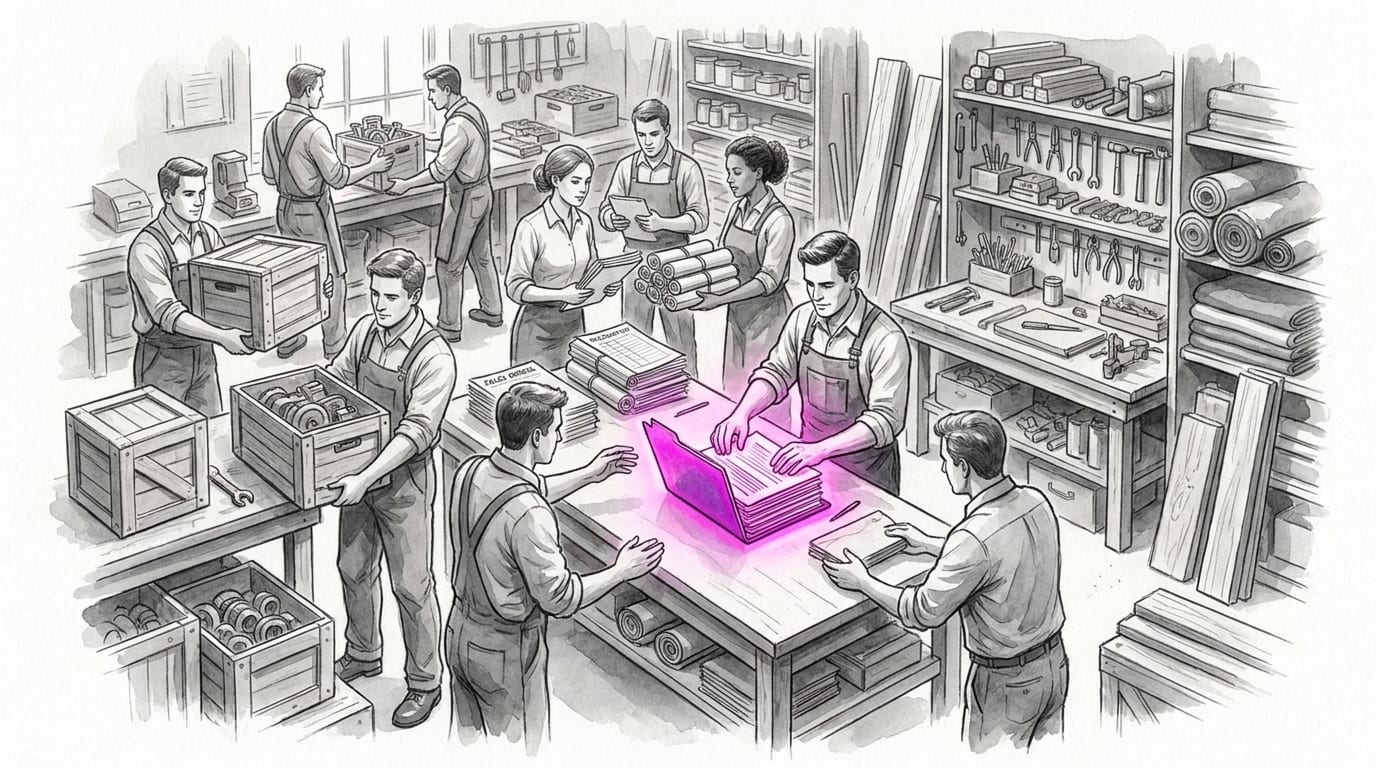
ERP Definition: What Is ERP?
ERP, or Enterprise Resource Planning, is software that connects a company’s core processes into one shared system and database. Instead of finance, inventory, sales, HR, and operations each keeping their own partial record, ERP creates a single operating record for the business.
A simple analogy: ERP is the nervous system of a growing company. A sale is not just a sale.
It touches stock, revenue, tax, delivery, commission, customer service, and reporting. ERP makes one business event travel through every department that needs to know.
That is why “enterprise” is a misleading word. ERP is not only for giant corporations.
A 40-person distributor with three warehouses may need ERP more urgently than a 300-person service company with simple workflows.
If you want the formal vendor definition too, Oracle describes ERP as software that manages day-to-day business activities and SAP frames ERP as integrated core processes across an enterprise. Useful definitions — but the operational test is still simpler: does one business event need to update many teams at once?
ERP vs Accounting Software vs CRM vs Inventory App
ERP gets confused with the tools it often contains. The difference is scope: point tools manage one function; ERP connects functions into one operating model.
| Term | What it means | Main function | Example |
|---|---|---|---|
| Accounting software | Finance system for bookkeeping and reporting | Invoices, expenses, tax, P&L | Xero, Jurnal, Accurate |
| CRM | Customer and sales management system | Pipeline, customer history, follow-up | HubSpot, custom CRM |
| Inventory app | Stock and warehouse management | Stock count, movement, reorder | WMS, POS inventory |
| ERP | Integrated operating system across departments | Shared data, workflow, reporting | Finance + stock + sales + HR + operations |
A business can run perfectly well with separate tools for years. ERP becomes valuable when the gaps between those tools cost more than the tools themselves. For example: sales promises stock that the warehouse does not have, finance closes the month with stale data, or management waits days for a report that should be visible in minutes.
Validate it in 2 weeks. Before spending heavily on ERP, we prove the assumptions with a 2-week Blueprint: process map, working prototype, and realistic cost numbers — see how Blueprint & Prototype works.
Why ERP Matters for a Growing Business
ERP matters because growth creates coordination debt. Every new branch, warehouse, channel, SKU, approval rule, and payroll exception adds another place where data can drift.
The first benefit is not “digital transformation.” It is fewer operational leaks. A distributor might stop losing margin to stock mismatches. A manufacturer might schedule production from actual demand instead of gut feel. A service company might connect project delivery to billing and cash flow.
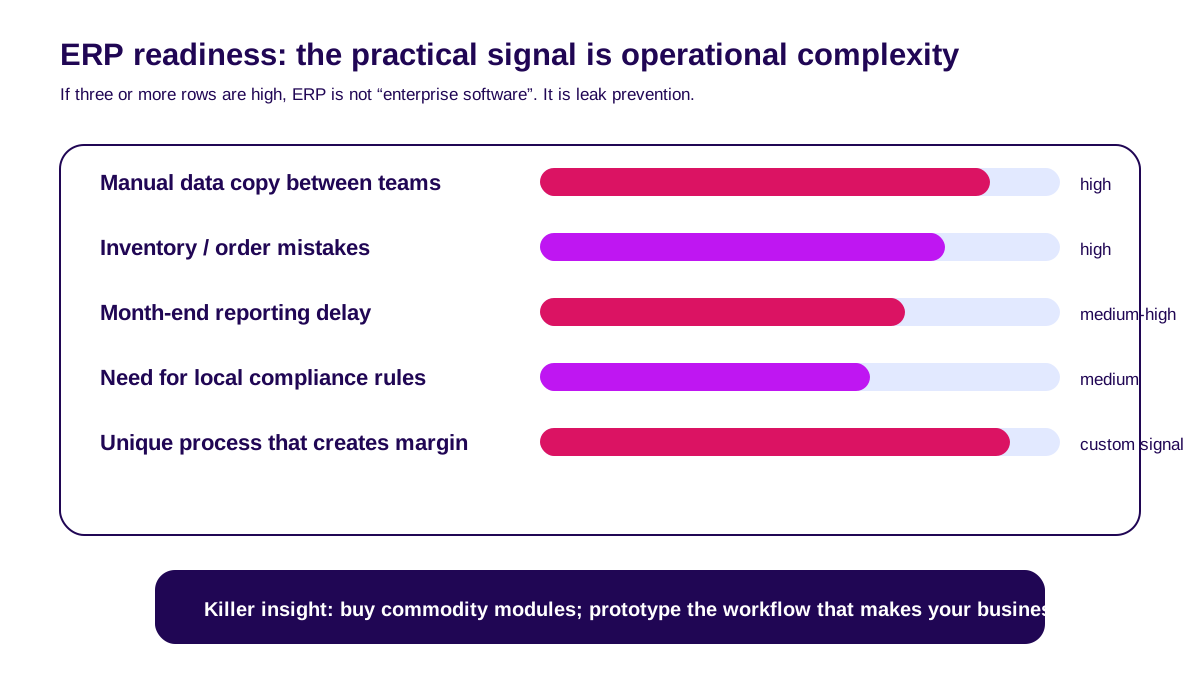
There are three practical signals that ERP may be worth exploring:
- People copy the same data into multiple systems. Copy-paste is not a workflow; it is a risk disguised as admin.
- Reports require reconciliation meetings. If the sales number, finance number, and warehouse number disagree, you do not have a reporting problem. You have a source-of-truth problem.
- Operational rules are getting local and specific. Indonesian payroll, tax, warehouse routing, purchase approvals, and branch-level pricing rules rarely fit cleanly into a generic app.
Next: How ERP Works With a Real Example.
How ERP Works With a Real Example
ERP works by turning one business event into a chain of updates across modules. The important part is not that every department has a screen. The important part is that every department shares the same record.
Imagine a retail distributor receives an order for 24 units from a corporate customer:
- Sales creates the order in the CRM or sales module.
- Inventory reserves 24 units from the correct warehouse.
- If stock falls below threshold, procurement gets a reorder signal.
- Finance creates an invoice and updates expected cash flow.
- Delivery receives a picking and dispatch task.
- Reporting updates revenue, margin, stock position, and service level.
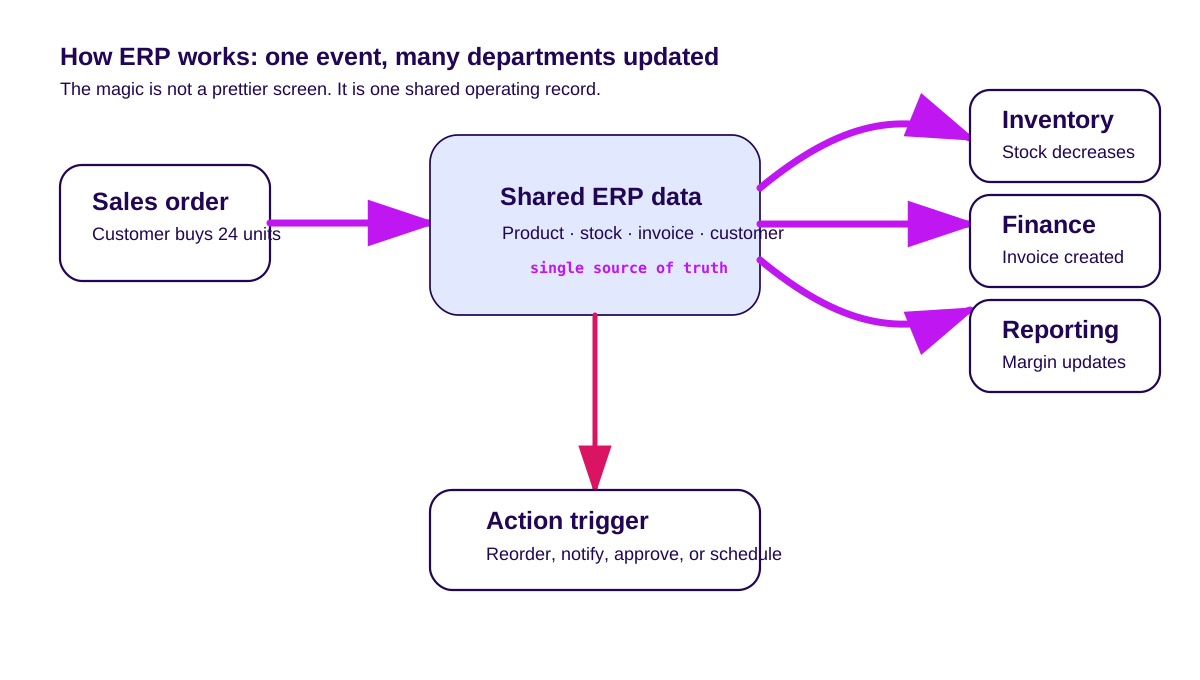
Without ERP, that same order may travel through WhatsApp, spreadsheets, accounting software, warehouse notes, and a weekly report. The work still happens, but the business pays for it in delay, errors, and missing context.
Good ERP reduces the number of places where humans must remember to keep systems aligned. It does not remove human judgment; it removes avoidable memory work.
Next: ERP Modules: The Core Components.
ERP Modules: The Core Components
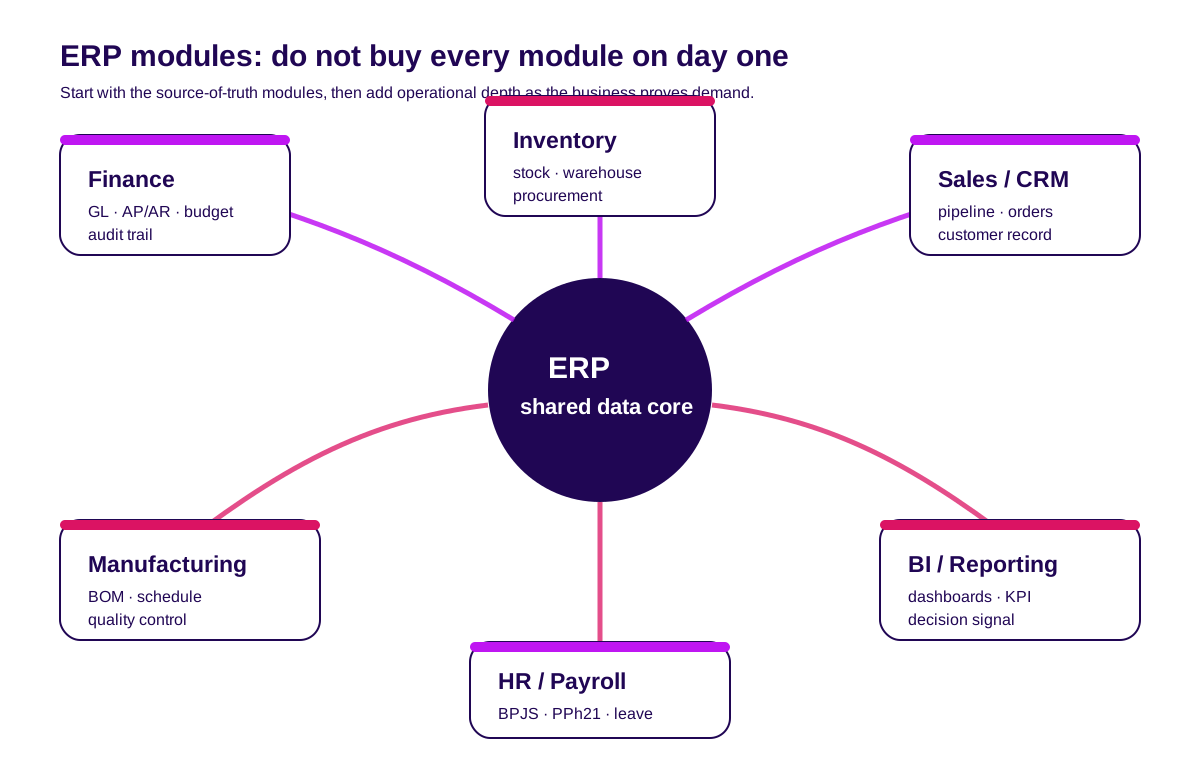
ERP systems are modular. That is good news, because trying to launch every module at once is how ERP projects become expensive theatre.
Finance and accounting
This is usually the spine of ERP: general ledger, accounts payable, accounts receivable, budgeting, cash flow, tax reporting, and audit trails. If finance is not connected, management decisions are always late.
Inventory and warehouse
Inventory modules track stock levels, stock movement, procurement, supplier orders, warehouse locations, and reorder rules. For retail, distribution, and manufacturing, this is often where ERP pays back fastest.
Sales and CRM
Sales modules manage leads, quotations, customer records, order history, pricing rules, and service tickets. When CRM is connected to ERP, sales can see stock and finance can see pipeline — without asking three people for a screenshot.
See our CRM software guide for a deeper dive.
HR and payroll
HR modules manage employee records, attendance, leave, payroll, performance, and compliance. In Indonesia, this often means BPJS, PPh 21, THR, leave rules, and approval flows that should not live in someone’s private spreadsheet.
Manufacturing and operations
For companies that make things, this module covers bill of materials, production scheduling, capacity planning, quality control, and shop-floor reporting. It connects what you sell to what you need to produce, buy, and schedule.
Business intelligence and reporting
Reporting is where ERP becomes visible to leadership. Dashboards, KPIs, exceptions, and cross-functional reports help teams see the business as a system, not as a stack of department updates.
Common ERP Types and Examples
There are three broad types of ERP decisions. The right one depends less on company size and more on process uniqueness.
Off-the-shelf ERP
These are packaged systems such as SAP Business One, Oracle NetSuite, Microsoft Dynamics, Odoo, or local accounting/operations suites. They are best when your process is standard and speed matters more than uniqueness.
The trade-off: you adapt to the software. That is acceptable when the process is commodity — accounting, basic procurement, simple inventory.
It is painful when your process is the reason customers choose you.
Custom ERP
Custom ERP is built around your workflows, data model, integrations, and business rules. It makes sense when your operations are genuinely different or when ERP is part of your competitive advantage.
The trade-off: you own maintenance, scope discipline, and future change. Custom ERP without a product owner becomes legacy software with nicer branding.
Hybrid ERP
Hybrid is often the smartest path: buy commodity modules, build the differentiating workflow, then connect them through APIs. For many growing businesses, the ERP is not one monolith; it is an integration strategy with a few custom modules.
For example: use a local accounting tool for compliance, a SaaS HR tool for payroll, then build a custom operations layer for your unique warehouse, production, or approval process. Our custom software development guide explains how to scope that safely.
ERP Implementation: A Safe Rollout Path
ERP fails when companies treat it as a software purchase instead of an operating-system change. The safer path is staged.
Step 1: Map the real process. Not the process from the SOP document — the one people actually use on Monday morning. Interview finance, warehouse, sales, HR, management, and the person who quietly fixes everyone’s spreadsheet.
Step 2: Define the source of truth. Decide which record owns customers, products, orders, stock, invoices, approvals, and employee data. Most ERP conflict comes from unclear ownership.
Step 3: Prototype one critical workflow. Before a full build or purchase, test one workflow end to end: order-to-cash, procure-to-pay, payroll approval, or stock transfer.
Step 4: Roll out by module. Start with the modules that reduce the biggest leak. Run parallel for one business cycle before switching off the old system.
Step 5: Measure adoption, not just launch. ERP is only working if people actually use it and if decisions get faster. Track cycle time, error rate, report delay, and manual work removed.
For technical planning, see our software blueprint guide before committing budget.
ERP Mistakes to Avoid
The biggest ERP mistake is buying the demo instead of buying the operating model. Vendor demos show happy paths. Your business runs on edge cases.
Avoid these traps:
- Big-bang rollout. Launching finance, HR, inventory, sales, and reporting at once multiplies risk.
- Feature-list buying. A long feature list does not mean the workflow fits.
- Ignoring local integrations. Payment gateways, WhatsApp, BPJS, tax, e-Faktur, and branch rules matter in Indonesia.
- No exit path. If you cannot export your data cleanly, the system owns you.
- No internal owner. ERP needs a business owner, not only an IT owner.
In our experience, ERP does not fail because a button is missing. It fails because no one agreed how the business should work before software tried to automate it.
Next: What I’d Tell a Founder Considering ERP.
What I’d Tell a Founder Considering ERP
Do not start with “which ERP should we buy?” Start with “which operational leak is now expensive enough to fix?” That question keeps you honest.
If the answer is simple bookkeeping, buy accounting software. If the answer is sales follow-up, buy or configure CRM.
If the answer is cross-department coordination, source-of-truth conflict, and unique operational rules, ERP becomes a real conversation.
And if ERP is a real conversation, do not make it a six-month guessing game. Map one critical workflow, prototype it, price the paths, then decide whether to buy, build, or hybrid.
How can you test one ERP transaction?
Reproducible test brief — illustrative inputs, not observed client results.
| Fixture | Check | Pass evidence |
|---|---|---|
| Order for 24 units | Reserve from the selected warehouse | One reservation tied to the order |
| Dispatch 24 units | Post stock movement and invoice | Document IDs match across modules |
| Return 2 units | Reverse stock and finance once | Net shipment and billed quantity both equal 22 |
Next: FAQ.
FAQ
What is ERP in simple words?
ERP is software that connects a company’s main departments — finance, inventory, sales, HR, operations, and reporting — into one shared system and database.
What is an example of ERP?
A distributor using one system for sales orders, warehouse stock, invoices, procurement, and management reporting is using ERP. Common ERP products include SAP Business One, Oracle NetSuite, Microsoft Dynamics, and Odoo.
What are the main ERP modules?
The main ERP modules are finance, inventory, procurement, sales/CRM, HR/payroll, manufacturing or operations, and business intelligence/reporting.
Is ERP only for big companies?
No. ERP is useful when operational complexity is high enough that separate tools create costly errors or delays.
A smaller company with multiple warehouses may need ERP before a larger company with simple workflows.
Should we buy ERP or build custom ERP?
Buy when your processes are standard. Build when your process is unique and creates competitive advantage.
Use a hybrid path when standard modules work for finance or HR but operations need custom workflows.
Related Posts
Two weeks to a real answer
Need help putting this into practice?
Book a Blueprint session and we'll turn the ideas in this article into a tested prototype in front of real users—2 weeks, from $3,000.